Using Extended AVPlayer
The Flower SDK provides the FlowerAVPlayer wrapper class for services using AVPlayer to insert ads. This maintains compatibility with existing AVPlayer while enabling ad integration with minimal changes.
Using these wrapper players is more convenient than manually controlling ad insertion, as they simplify the integration process. You can also subclass these players for further customization. However, when overriding methods, it is essential to call the superclass implementation to ensure proper behavior.
Work Process
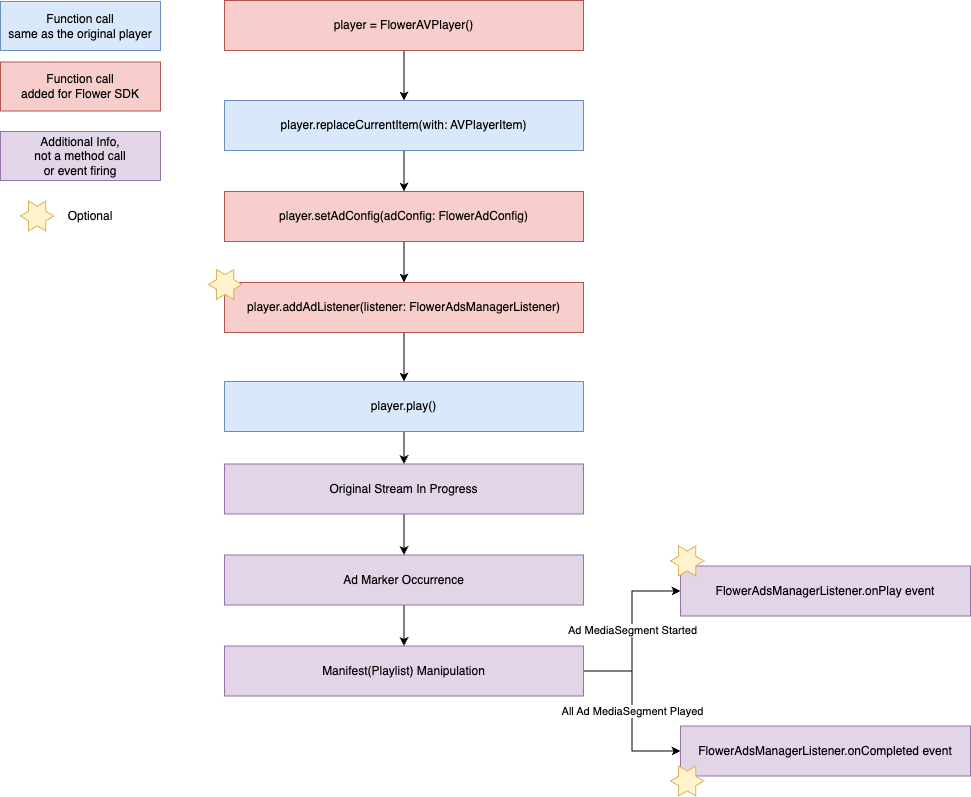
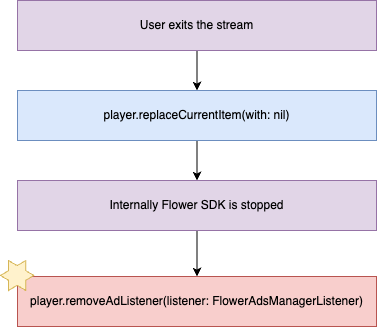
-
Replace the player type and constructor from AVPlayer to FlowerAVPlayer in existing code using AVPlayer.
-
Create an ad configuration object with appropriate values such as the pre-issued Tag URL. The classes used are:
- For linear channels / FAST: FlowerLinearTvAdConfig
-
Before playing the main content, pass the ad configuration object to the player using
replaceCurrentItem(with:adConfig:).Note: This step is mandatory to enable ads.
-
If necessary, register an ad event listener with the player. The ad event listener can be created by implementing the FlowerAdsManagerListener interface from the "Receiving Ad Events" document.
-
Play the player.
Below are the Flower SDK APIs used in the example code.
FlowerAVPlayer
A player class that extends the existing AVFoundation's AVPlayer class to enable ad integration through connection with the Flower backend system.
FlowerAVPlayer.replaceCurrentItem(with:adConfig:)
Replaces the current player item and sets the ad configuration in a single call. This is the recommended way to start playback with ads.
| Parameter | Type | Description |
|---|---|---|
| item | AVPlayerItem? | The player item to play |
| adConfig | FlowerAdConfig | Ad configuration (FlowerLinearTvAdConfig or FlowerVodAdConfig) |
FlowerAVPlayer.addAdListener
Adds an ad event listener to the player. If the listener is already registered, nothing happens.
The following describes the parameters:
| Parameter | Type | Description |
|---|---|---|
| listener | FlowerAdsManagerListener | Ad event listener to add |
FlowerAVPlayer.removeAdListener
Removes an ad event listener from the player. If the listener is not registered, nothing happens.
The following describes the parameters:
| Parameter | Type | Description |
|---|---|---|
| listener | FlowerAdsManagerListener | Ad event listener to remove |
FlowerLinearTvAdConfig
Class used to specify information required for ad insertion in live broadcasts.
FlowerLinearTvAdConfig.init
The following describes the constructor parameters:
| Parameter | Type | Description |
|---|---|---|
| adTagUrl | String | Ad tag URL issued by the Flower backend system |
| prerollAdTagUrl | String? | (Optional) Ad tag URL issued by the Flower backend system for pre-roll |
| channelId | String | Unique channel ID Must be registered in the Flower backend system |
| extraParams | [String: String] | (Optional) Additional pre-agreed information for targeting |
| adTagHeaders | [String: String] | (Optional) HTTP header information to add when requesting ads |
| channelStreamHeaders | [String: String] | (Optional) HTTP header information to add when requesting the original stream |
Receiving Ad Events – FlowerAdsManagerListener
When inserting ads into linear channels, ads that replace the main stream are played through ad markers (e.g., SCTE-35). UI control and other logic may be needed at ad playback start/end points. For this purpose, the Flower SDK provides a listener interface for receiving ad events, which can be implemented as follows.
class FlowerAdsManagerListenerImpl: FlowerAdsManagerListener {
    func onPrepare(adDurationMs: Int32) {
        // TODO GUIDE: need nothing for linear tv
    }

    func onPlay() {
        // OPTIONAL GUIDE: enable additional actions for ad playback
        hidePlayerControls()
    }

    func onCompleted() {
        // OPTIONAL GUIDE: disable additional actions after ad complete
        showPlayerControls()
    }

    func onError(error: FlowerError?) {
        // TODO GUIDE: restart to play Linear TV on ad error
        releasePlayer()
        playLinearTv()
    }

    func onAdSkipped(reason: Int32) {
        os_log(OSLogType.info, log: .default, "onAdSkipped: %d", reason)
    }
}
// Register the listener with FlowerAVPlayer
player.addAdListener(listener: adsManagerListener)
Linear Channel Ad Request Example
SwiftUI
struct PlaybackView: View {
    // TODO GUIDE: Replace your AVPlayer with FlowerAVPlayer
    private var player = FlowerAVPlayer()

    // OPTIONAL GUIDE: Create FlowerAdsManagerListener instance
    @State private var flowerListener: FlowerAdsManagerListener!

    var body: some View {
        FlowerVideoPlayer(player: player)
            .frame(maxWidth: .infinity, maxHeight: .infinity)
            .onAppear {
                self.playLinearTv()
            }
            .onDisappear {
                player.removeAdListener(listener: flowerListener)
                player.pause()
                player.replaceCurrentItem(with: nil)
            }
    }

    private func playLinearTv() {
        let videoUrl = "https://video_url"

        // TODO GUIDE: Configure linear tv ad
        let adConfig = FlowerLinearTvAdConfig(
            adTagUrl: "https://ad_request",
            prerollAdTagUrl: "https://preroll_ad_request",
            channelId: "1",
            extraParams: [
                "title": "My Summer Vacation",
                "genre": "horror",
                "contentRating": "PG-13"
            ],
            adTagHeaders: [
                "custom-ad-header": "custom-ad-header-value"
            ],
            channelStreamHeaders: [
                "custom-stream-header": "custom-stream-header-value"
            ]
        )
        // TODO GUIDE: Pass ad config together with the player item
        player.replaceCurrentItem(with: AVPlayerItem(url: URL(string: videoUrl)!), adConfig: adConfig)

        // OPTIONAL GUIDE: Implement FlowerAdsManagerListener to receive ad events
        class FlowerAdsManagerListenerImpl: FlowerAdsManagerListener {
            func onPrepare(adDurationMs: Int32) {
                // OPTIONAL GUIDE: Implement custom actions for when the ad playback is prepared
            }
            func onPlay() {
                // OPTIONAL GUIDE: Implement custom actions for when the ad playback starts
            }
            func onCompleted() {
                // OPTIONAL GUIDE: Implement custom actions for when the ad playback ends
            }
            func onError(error: FlowerError?) {
                // OPTIONAL GUIDE: Implement custom actions for when the error occurs in Flower SDK
            }
            func onAdSkipped(reason: Int32) {
                // OPTIONAL GUIDE: Implement custom actions for when the ad playback is skipped
            }
            func onAdBreakPrepare(adInfos: NSMutableArray) {
                // Not used in live streams. Required for VOD/Interstitial ad breaks only.
            }
        }
        // OPTIONAL GUIDE: Register FlowerAdsManagerListener to receive ad events
        flowerListener = FlowerAdsManagerListenerImpl()
        player.addAdListener(listener: flowerListener)

        player.play()
    }
}
UIKit
class PlaybackViewController: UIViewController {
    // TODO GUIDE: Replace your AVPlayer with FlowerAVPlayer
    private var player = FlowerAVPlayer()

    // OPTIONAL GUIDE: Create FlowerAdsManagerListener instance
    private var flowerListener: FlowerAdsManagerListener!

    override func viewDidLoad() {
        super.viewDidLoad()

        let playerViewController = FlowerAVPlayerViewController()
        playerViewController.player = player
        view.addSubview(playerViewController.view)
        addChild(playerViewController)
        playerViewController.didMove(toParent: self)

        NSLayoutConstraint.activate([
            playerViewController.view.topAnchor.constraint(equalTo: view.topAnchor),
            playerViewController.view.bottomAnchor.constraint(equalTo: view.bottomAnchor),
            playerViewController.view.leadingAnchor.constraint(equalTo: view.leadingAnchor),
            playerViewController.view.trailingAnchor.constraint(equalTo: view.trailingAnchor),
        ])

        playLinearTv()
    }

    override func viewWillDisappear(_ animated: Bool) {
        super.viewWillDisappear(animated)
        player.removeAdListener(listener: flowerListener)
        player.pause()
        player.replaceCurrentItem(with: nil)
    }

    private func playLinearTv() {
        let videoUrl = "https://video_url"

        // TODO GUIDE: Configure linear tv ad
        let adConfig = FlowerLinearTvAdConfig(
            adTagUrl: "https://ad_request",
            prerollAdTagUrl: "https://preroll_ad_request",
            channelId: "1",
            extraParams: [
                "title": "My Summer Vacation",
                "genre": "horror",
                "contentRating": "PG-13"
            ],
            adTagHeaders: [
                "custom-ad-header": "custom-ad-header-value"
            ],
            channelStreamHeaders: [
                "custom-stream-header": "custom-stream-header-value"
            ]
        )
        // TODO GUIDE: Pass ad config together with the player item
        player.replaceCurrentItem(with: AVPlayerItem(url: URL(string: videoUrl)!), adConfig: adConfig)

        // OPTIONAL GUIDE: Implement FlowerAdsManagerListener to receive ad events
        class FlowerAdsManagerListenerImpl: FlowerAdsManagerListener {
            func onPrepare(adDurationMs: Int32) {
                // OPTIONAL GUIDE: Implement custom actions for when the ad playback is prepared
            }
            func onPlay() {
                // OPTIONAL GUIDE: Implement custom actions for when the ad playback starts
            }
            func onCompleted() {
                // OPTIONAL GUIDE: Implement custom actions for when the ad playback ends
            }
            func onError(error: FlowerError?) {
                // OPTIONAL GUIDE: Implement custom actions for when the error occurs in Flower SDK
            }
            func onAdSkipped(reason: Int32) {
                // OPTIONAL GUIDE: Implement custom actions for when the ad playback is skipped
            }
            func onAdBreakPrepare(adInfos: NSMutableArray) {
                // Not used in live streams. Required for VOD/Interstitial ad breaks only.
            }
        }
        // OPTIONAL GUIDE: Register FlowerAdsManagerListener to receive ad events
        flowerListener = FlowerAdsManagerListenerImpl()
        player.addAdListener(listener: flowerListener)

        player.play()
    }
}