SDK Architecture
This guide explains the SDK architecture, video layer structure, module interactions and lifecycle, and how to integrate ad delivery into your OTT services.
Lifecycle
The lifecycle has three variations, depending on the type of media you're integrating advertising into. These are outlined below.
Insert Ads into Live Channels / FAST
This SDK allows you to play ads when a viewer enters live HLS/DASH content or insert replacement ads into live HLS/DASH content by processing the playlist manifest (m3u8 or mpd) using ad markers.
Ad Type
Main Stream Replacement Ads
This ad type replaces the main content stream using ad markers (e.g., SCTE-35). When a replacement ad plays or finishes, the SDK sends events to the host service.
Channel Entry Ads
These ads play before a viewer enters the main content stream. When a viewer requests to watch live content, they will first see the entry ad. Once the entry ad finishes, the viewer will seamlessly transition to the main content stream. The SDK does not provide ad events for this ad type.
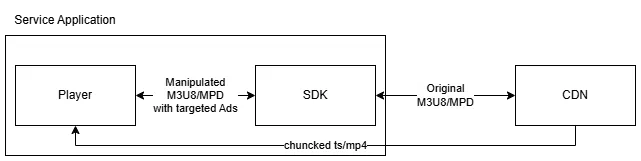
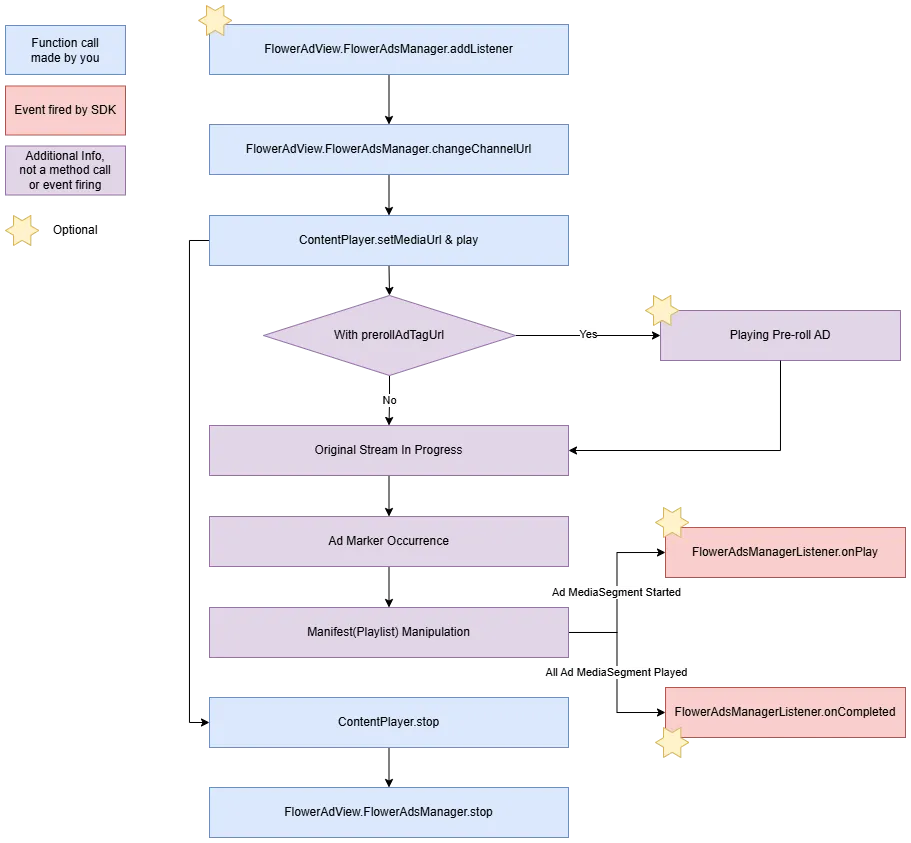
mux.
Insert Ads into VOD
This SDK enables you to seamlessly integrate three types of ads into your VOD content:
- Pre-roll ads: Commercials played before the video content starts.
- Mid-roll ads: Commercials played during the video stream.
- Post-roll ads: Commercials played at the end of the video stream.
The FLOWER backend manages the ad policies for each type and delivers them to the SDK in VMAP format.
To integrate ads into your VOD content:
- Register an implementation of
FlowerAdsManagerListener. - Call
FlowerAdsManager.requestVodAdbefore playing the VOD content. - Use the events sent through
FlowerAdsManagerListenerto pause or resume your VOD content based on the ad playback.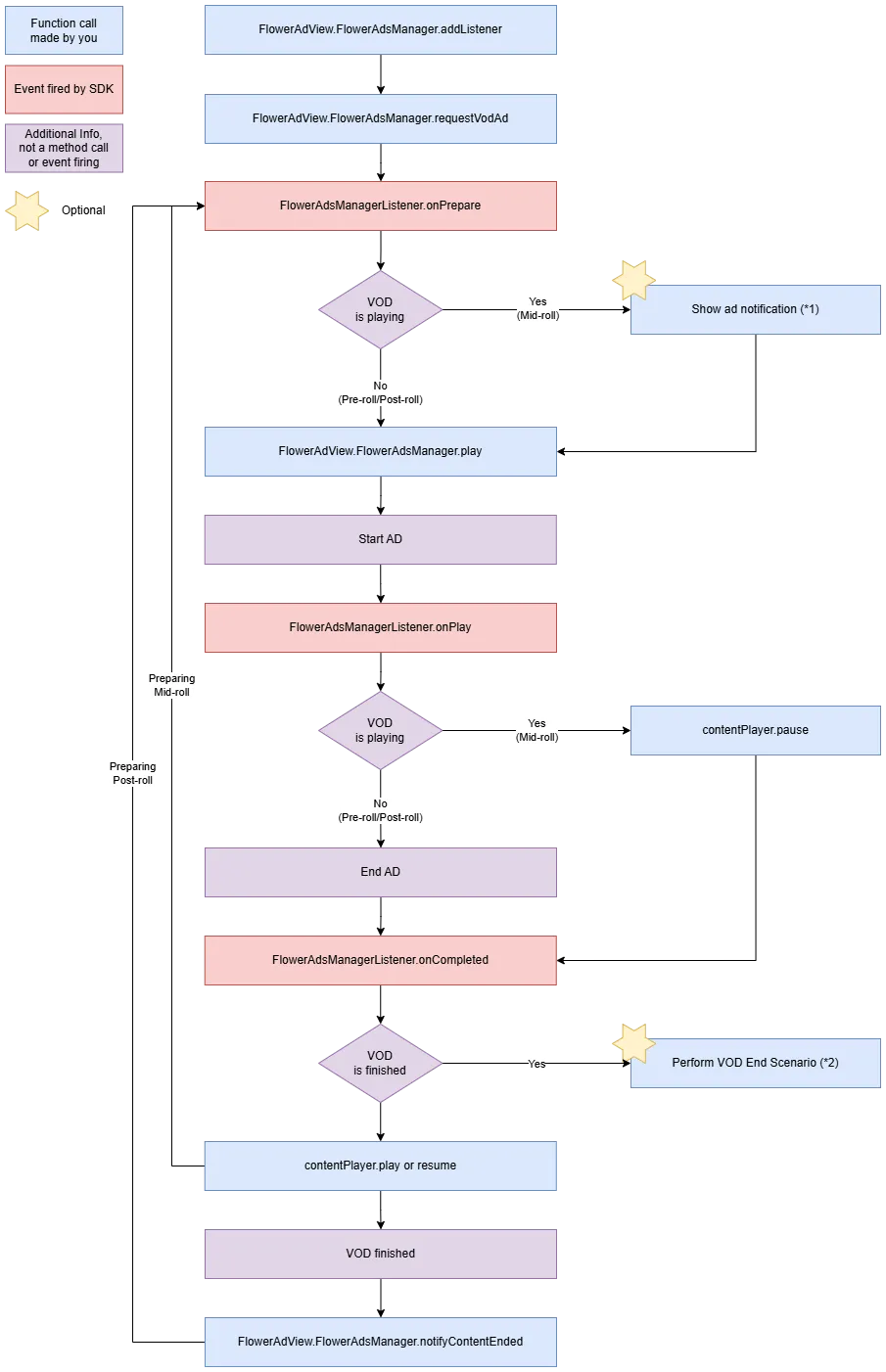
(*1) Show ad notification
- To enhance the user experience, you can display an ad notification before a mid-roll ad plays in accordance with your service policy.
- e.g. An ad will start in 5 seconds.
(*2) Perform VOD end scenario
- This SDK provides a way to handle specific scenarios at the end of VOD playback, after any post-roll ads have finished. This allows you to implement custom actions or transitions based on your service's requirements.
- e.g. Automatically start the next episode in a series.
Insert Interstitial Ads
This SDK enables you to seamlessly integrate full-screen interstitial ads into your app, game, or website's user interface.
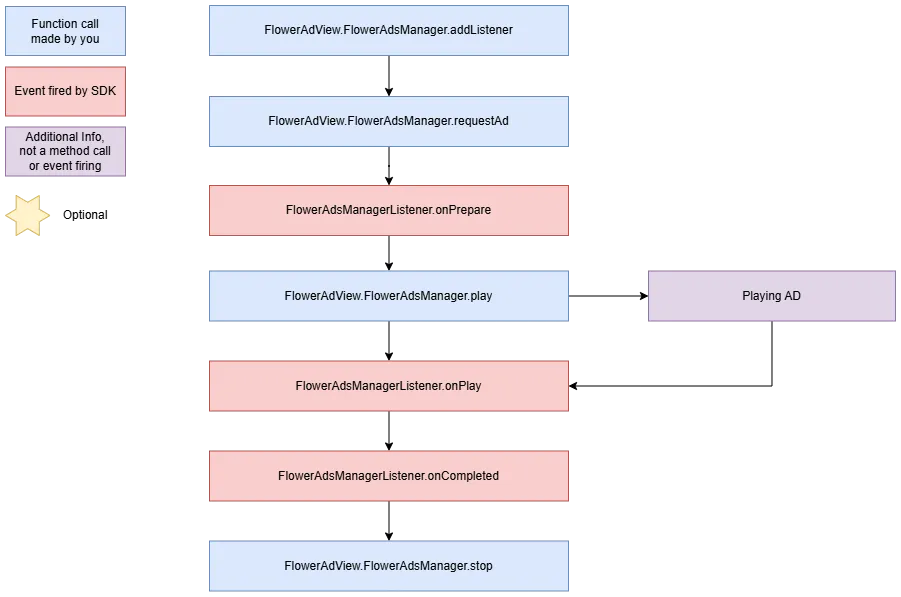
View Layer Arrangement
The AdView must be the same size as the view in which the main player is placed and overlap that view completely.
AdView is displayed transparently by default, and “Show more” or “Skip” buttons or overlay advertisements can be displayed on it if needed.