SDK Architecture
Basic Structure
The following diagram illustrates the communication flow between the TV app, the SDK, the ad agent, and the ad server.
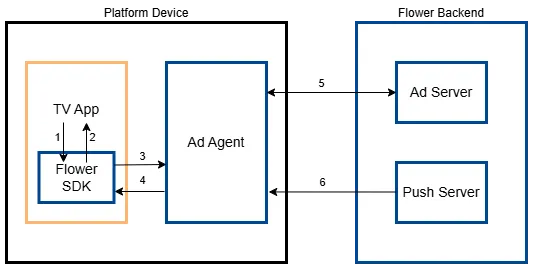
- Controls the SDK by initializing it, sending TV events, and if using SCTE-35, forwarding TS stream packets.
- Detects SCTE-35 or analog cue and communicates with the TV app to play ads at the correct timing.
- Forwards the events received from the TV app to the ad agent.
- Forwards information such as the targeted ad list and operation mode received from the backend server to the SDK.
- Requests information such as the targeted ad list and operation mode from the backend server, and sends events such as impressions and status changes to the backend server using HTTP connection.
- Sends commands that control the operation of ad agent.
Main Design Concept of Ad Agent
In the FLOWER architecture, the backend system controls ad system operation. Client devices simply act on server instructions and report results. This approach allows for flexible ad operation management. You can adapt to changes by updating the backend system, minimizing the need for client-side software updates.
To achieve this, the ad agent running on the client device consists of the following modules:
Ad Agent Operation and Authentication Module
This module is activated when the TV app sends an initialization command or when the backend server sends a re-authentication command.
Push Command Reception Module
This module receives and processes commands sent by the push server over a TCP socket. While the default port is 31102, this may change depending on the device situation.
The backend system monitors the device's operating status in real time, allowing for dynamic adjustments to ad delivery strategies and quick responses to events. This module, which acts as the client in the server push framework, must remain active to receive these time-sensitive commands. However, its performance impact is minimal because it performs simple tasks only. In contrast, other modules are activated only when required.
Main Features
- Re-Authenticate Instructs the device to re-authenticate with the backend server. This process ensures the device receives the most up-to-date advertising configuration, which may include targeting parameters, frequency capping rules, and other relevant settings.
- Perform Ad Sync Instructs the device to synchronize its ad list with the one assigned by the backend server.
- Receive Analog Ad Cue The Anypoint platform receives the ad cue detected by the Head-End (H/E) system and instructs the device to start playing the ad.
- Stop Ads Instructs a particular ad to be stopped immediately. This might be necessary due to user requests, error conditions, ad expiration, or other unforeseen circumstances.
- Send Logs Sends log files stored in the device (up to 20 KB) to the backend server in chunks. These logs contain valuable information such as ad events, errors encountered, and performance data, which can be used for debugging and system analysis.
Creative Download and Management Module
Upon receiving the ad sync command from the backend system, this module requests and downloads a list of creatives using CDN URLs. Download speed and capacity are managed based on device type (e.g., limiting downloads on low-memory devices to prioritize live broadcasting) to ensure optimal performance.
To optimize ad delivery, the backend system selects ads to minimize download times while maximizing targeting reach. This involves considering various factors, including the device's storage capacity, current storage usage, audience segments, geographic location, the channel being watched, and the assigned priority of each ad.
Advertisement Storage Usage Policy
The advertising agent employs two configurations to ensure optimal set-top box (STB) operation without affecting its functionality. These values can be updated at any time by the server and are determined through discussions based on specific STB types and conditions.
- Minimum Guaranteed Free Space
- This refers to the minimum storage capacity reserved exclusively for ensuring proper STB functionality, independent of advertising purposes.
- For instance, if 300MB is required to remain available for firmware updates, it is recommended to set this value at 300MB or higher.
- The agent uses storage for advertisement caching only when the available storage exceeds this threshold.
- For example, if this value is set at 300MB and the current free storage is 350MB, only up to 50MB can be utilized for caching advertisements.
- Maximum Advertisement Storage Capacity
- This defines the maximum storage space allocated for caching advertisements. Even if additional storage space is available beyond this limit, it will not be utilized for advertisements.
Advertisement Available Storage Calculation
Based on the two configurations above, the calculation for the available advertisement caching storage is as follows:
Available Advertisement Storage = min((Remaining Storage - Minimum Guaranteed Free Space), Maximum Advertisement Storage Capacity)
Example 1
Remaining Storage: 789MB
Minimum Guaranteed Free Space: 500MB
Maximum Advertisement Storage Capacity: 700MB
=> Available Advertisement Storage: 289MB (Calculated as min((789MB - 500MB), 700MB))
Example 2
Remaining Storage: 6789MB
Minimum Guaranteed Free Space: 500MB
Maximum Advertisement Storage Capacity: 700MB
=> Available Advertisement Storage: 700MB (Calculated as min((6789MB - 500MB), 700MB))
Device Event Passing Module
This module sends ad-related events and state changes to the backend server for monitoring, analysis, and optimization.
TV Event Reception Module
This module uses the Broadcast Intent built into Android to exchange events with the SDK integrated into the TV app.
Ad Agent Authentication and Ad Synchronization
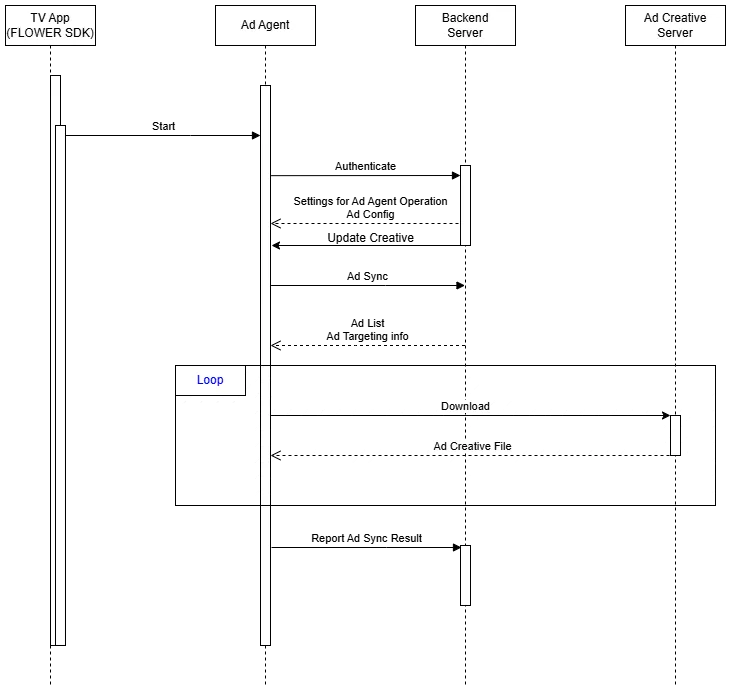
When the SDK starts the ad agent, it initiates an authentication process with the backend server. The server's response includes settings for the ad agent's default operation and ad configuration.
After successful authentication, the ad agent performs ad synchronization to receive the latest ad creatives and targeting information. This synchronization process occurs periodically to ensure the ad agent has the most up-to-date ad content.
Once synchronization is complete, the ad agent is ready to process ad cues, construct ad lists, and initiate ad playback.
Sequence for Authentication and Ad Sync
Ad Playback by SDK
This section describes the following two approaches on how the ad agent controls the SDK to play creatives:
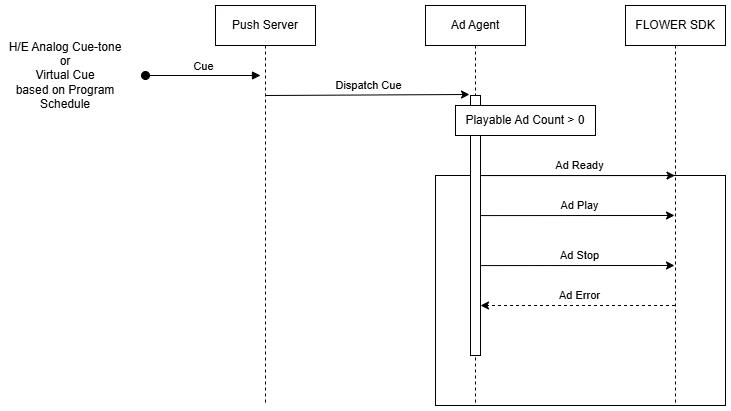
Receiving Ad Cues from Push Server
This approach is used when analog cue tones detected by the Head-End (H/E) system are relayed to devices via the Anypoint platform. It is also used when virtual cues are generated and transmitted based on the broadcast program schedule.
Sequence Diagram
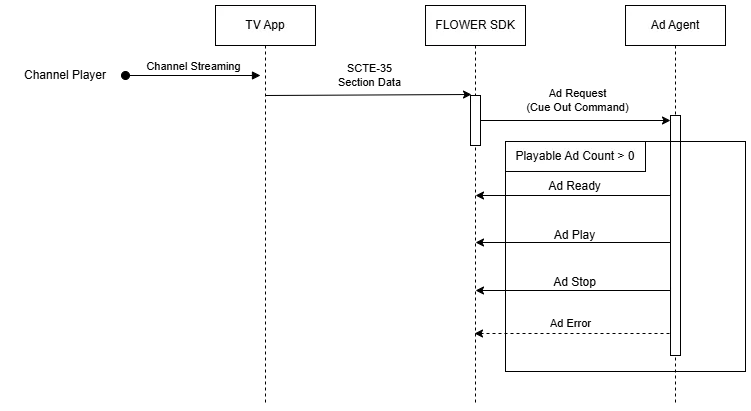
Receiving Ad Cues via SCTE-35
This approach is used when ad cues compliant to the SCTE-35 standard are inserted into the channel stream. The SDK supports the SCTE-35 SpliceSchedule and SpliceInsert method for splicing replacement ads.
Sequence Diagram
Video Layer Arrangement
This section explains the arrangement of video layers and the purpose of each layer.

TV Screen Layer Sequence
- Linear TV layer: This layer, positioned at the bottom, plays the real-time broadcast video with the broadcast player.
- Advertisement layer: Positioned above the broadcast layer, this layer displays ad videos using the ad player.
- Advertisement UI layer: This layer provides interactive features related to the displayed ads. It may display elements such as "Learn More" buttons, product information overlays, and purchase options, allowing viewers to engage with the ads.
- TV App UI layer: Located at the top, this layer provides users with convenience features to control the viewing experience. It typically includes controls for volume adjustment, channel selection, closed captions, and program information. This layer is managed by the TV app to provide a familiar and consistent user interface.
Lifecycle
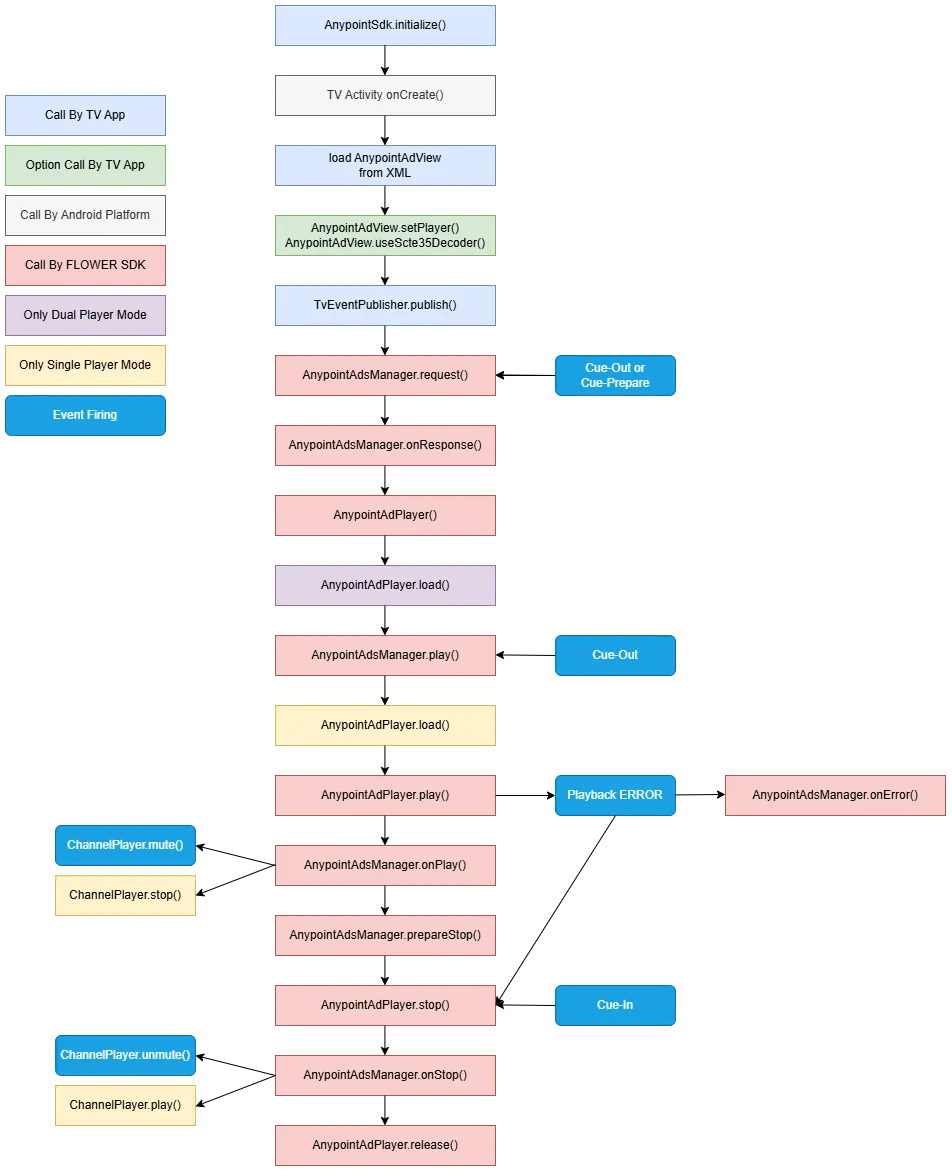
The diagram below shows the overall operational flow from SDK initialization to release. For your understanding, each step is color-coded based on the actor and type of the process.