Using Extended AVPlayer
The Flower SDK provides the FlowerAVPlayer wrapper class for services using AVPlayer to insert ads. This maintains compatibility with existing AVPlayer while enabling ad integration with minimal changes.
Using these wrapper players is more convenient than manually controlling ad insertion, as they simplify the integration process. You can also subclass these players for further customization. However, when overriding methods, it is essential to call the superclass implementation to ensure proper behavior.
Work Process
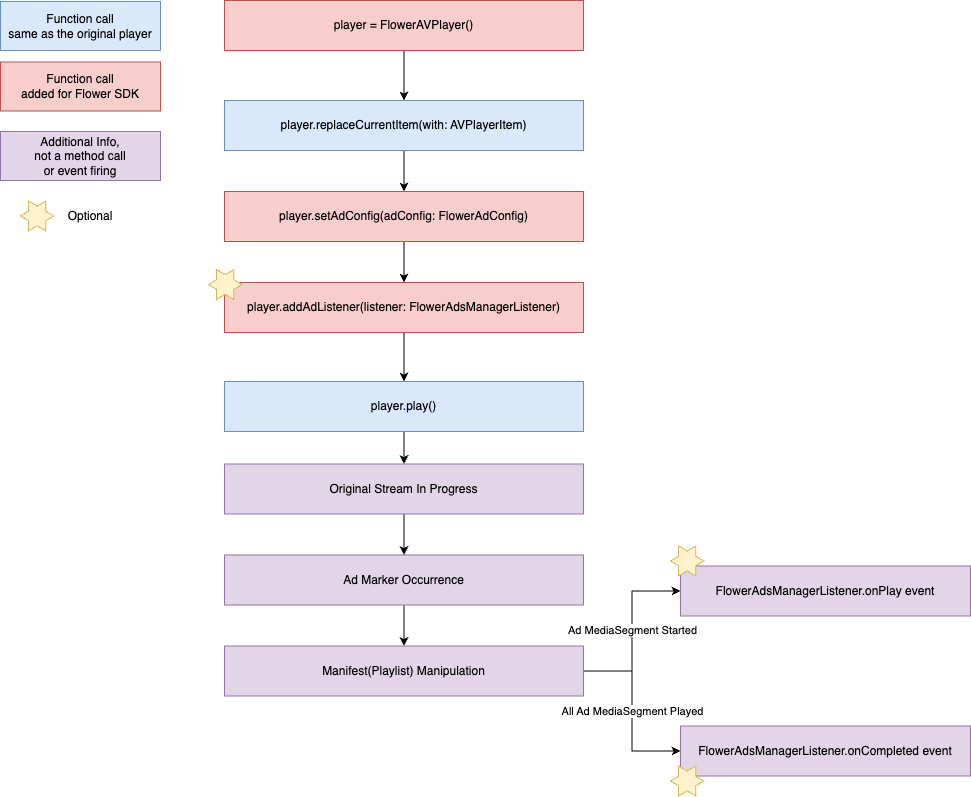
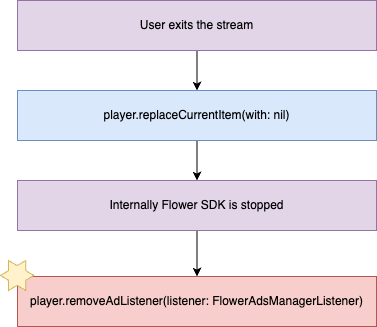
-
Replace the player type and constructor from AVPlayer to FlowerAVPlayer in existing code using AVPlayer.
-
Create an ad configuration object with appropriate values such as the pre-issued Tag URL. The classes used are:
- For linear channels / FAST: FlowerLinearTvAdConfig
- For VOD: FlowerVodAdConfig
-
Before playing the main content, pass the ad configuration object to the player using
replaceCurrentItem(with:adConfig:).Note: This step is mandatory to enable ads.
-
If necessary, register an ad event listener with the player. The ad event listener can be created by implementing the FlowerAdsManagerListener interface from the "Receiving Ad Events" document.
-
Play the player.
Below are the Flower SDK APIs used in the example code.
FlowerAVPlayer
A player class that extends the existing AVFoundation's AVPlayer class to enable ad integration through connection with the Flower backend system.
FlowerAVPlayer.replaceCurrentItem(with:adConfig:)
Replaces the current player item and sets the ad configuration in a single call. This is the recommended way to start playback with ads.
| Parameter | Type | Description |
|---|---|---|
| item | AVPlayerItem? | The player item to play |
| adConfig | FlowerAdConfig | Ad configuration (FlowerLinearTvAdConfig or FlowerVodAdConfig) |
FlowerAVPlayer.addAdListener
Adds an ad event listener to the player. If the listener is already registered, nothing happens.
The following describes the parameters:
| Parameter | Type | Description |
|---|---|---|
| listener | FlowerAdsManagerListener | Ad event listener to add |
FlowerAVPlayer.removeAdListener
Removes an ad event listener from the player. If the listener is not registered, nothing happens.
The following describes the parameters:
| Parameter | Type | Description |
|---|---|---|
| listener | FlowerAdsManagerListener | Ad event listener to remove |
FlowerLinearTvAdConfig
Class used to specify information required for ad insertion in live broadcasts.
FlowerLinearTvAdConfig.init
The following describes the constructor parameters:
| Parameter | Type | Description |
|---|---|---|
| adTagUrl | String | Ad tag URL issued by the Flower backend system |
| prerollAdTagUrl | String? | (Optional) Ad tag URL issued by the Flower backend system for pre-roll |
| channelId | String | Unique channel ID Must be registered in the Flower backend system |
| extraParams | [String: String] | (Optional) Additional pre-agreed information for targeting |
| adTagHeaders | [String: String] | (Optional) HTTP header information to add when requesting ads |
| channelStreamHeaders | [String: String] | (Optional) HTTP header information to add when requesting the original stream |
Pre-roll Ads
A channel pre-roll is an ad that plays once when the viewer enters a channel, before the live stream starts. To enable it, set prerollAdTagUrl of FlowerLinearTvAdConfig. FlowerAVPlayer handles the pre-roll flow by itself, so the app does not need a temporary listener:
replaceCurrentItem(with:adConfig:)requests the pre-roll and holds the channel item.- When you call
play(), the pre-roll plays in the SDK's ad player, shown over the content. Listeners added withaddAdListenerreceive itsonPrepare,onPlayandonCompleted. - When the pre-roll ends, the player loads the channel and starts playback.
- No pre-roll ad or request failure: The SDK calls
onCompletedand the channel starts as usual. - Pre-roll playback error: It arrives as
onError, andFlowerAVPlayerdoes not load the channel. Restart the channel in a newFlowerAVPlayerinstance (see the "Restarting the channel ononError" note below). - Channel switch: Calling
replaceCurrentItem(with:adConfig:)with the next channel's configuration stops the previous session and requests the new channel's pre-roll. - Same channel again: If the channel has not changed, the pre-roll is skipped. Setting the same channel's ad configuration again without a channel change, for example on a restart after
onError, skips the pre-roll even thoughprerollAdTagUrlis set, and the player loads the channel right away. A channel change plays the pre-roll again: A → B → A plays A's pre-roll again, and so does requesting VOD or inline ads in between.stop()and leaving the player screen are not a channel change, so returning to the same channel afterwards skips the pre-roll. - User leaving the app: In the default mode (
FlowerSdk.setIgnoreAdBreakInPIPMode(true)), a pre-roll that is playing when the user leaves the app (FlowerSdk.notifyUserLeftApp(true)) is paused and resumes when the user comes back, in the same way as VOD ads.
FlowerVodAdConfig
Class used to specify information required for ad insertion in VOD content played by FlowerAVPlayer. See VOD Pre-roll, Mid-roll, Post-roll Ad Implementation for how VOD ads behave.
FlowerVodAdConfig.init
The following describes the constructor parameters:
| Parameter | Type | Description |
|---|---|---|
| adTagUrl | String | Ad tag URL issued by the Flower backend system |
| contentId | String | Unique content ID Must be registered in the Flower backend system |
| contentDuration | Int64 | Total playback time of the VOD content (ms) |
| extraParams | [String: String] | (Optional) Additional pre-agreed information for targeting |
| adTagHeaders | [String: String] | (Optional) HTTP header information to add when requesting ads |
| requestTimeout | Int64? | (Optional) Timeout of the VOD ad request and of each mid-roll ad request (ms). Default: 5000 |
| minPrepareDuration | Int64? | (Optional) Extra lead time for a mid-roll (ms). A mid-roll is requested requestTimeout + minPrepareDuration before its position. Default: 5000 |
| rewindDuration | Int64? | (Optional) How far before the interrupted position the content resumes after a mid-roll (ms). Default: 5000 |
requestTimeout, minPrepareDuration and rewindDuration can only be set through FlowerVodAdConfig. FlowerAdsManager.requestVodAd(...) has no such parameters, so when you call it directly (for example with a MediaPlayerHook), the SDK always uses the default values.
Receiving Ad Events – FlowerAdsManagerListener
When inserting ads into linear channels, ads that replace the main stream are played through ad markers (e.g., SCTE-35). UI control and other logic may be needed at ad playback start/end points. For this purpose, the Flower SDK provides a listener interface for receiving ad events, which can be implemented as follows.
class FlowerAdsManagerListenerImpl: FlowerAdsManagerListener {
    func onPrepare(adDurationMs: Int32) {
        // TODO GUIDE: need nothing for linear tv
    }

    func onPlay() {
        // OPTIONAL GUIDE: enable additional actions for ad playback
        hidePlayerControls()
    }

    func onCompleted() {
        // OPTIONAL GUIDE: disable additional actions after ad complete
        showPlayerControls()
    }

    func onError(error: FlowerError?) {
        // TODO GUIDE: on an ad error, stop the ads manager and restart the channel
        //             (see restartLinearTvAfterError() in the examples below).
        //             The SDK calls this off the main thread, so hop to main first.
        DispatchQueue.main.async {
            restartLinearTvAfterError()
        }
    }

    func onAdBreakSkipped(reason: Int32) {
        os_log(OSLogType.info, log: .default, "onAdBreakSkipped: %d", reason)
    }
}
// Register the listener with FlowerAVPlayer
player.addAdListener(listener: adsManagerListener)
onErrorFor a linear channel, when onError is called, stop the ads manager with player.flowerAdView.adsManager.stop(), release the current item with player.replaceCurrentItem(with: nil), and start the channel again the same way it was first started: replaceCurrentItem(with:adConfig:) with a new AVPlayerItem of the original stream URL and the FlowerLinearTvAdConfig, then play(). replaceCurrentItem(with: nil) also clears the ad configuration held by FlowerAVPlayer, so always pass the ad configuration again. Build the restart's FlowerLinearTvAdConfig with exactly the same values as the first start, including prerollAdTagUrl. The channel has not changed, so the SDK skips the pre-roll (see Pre-roll Ads): the viewer does not see it again, and FlowerAVPlayer loads and plays the channel right away. Do this on the main thread.
When content playback stops and the SDK cannot recover it, onError is called with a message starting with playback unrecoverable. onError is also called when an internal SDK error occurs. In both cases, restart the channel in the same way.
A pre-roll (prerollAdTagUrl) playback error also arrives as onError. In that case FlowerAVPlayer does not load the channel. If onError arrives before the channel item was loaded (player.currentItem == nil), restart the channel in a new FlowerAVPlayer instance instead of the same one, because the failed player stays set up for its pre-roll and would act on the next ad events again.
Linear Channel Ad Request Example
SwiftUI
struct PlaybackView: View {
    // TODO GUIDE: Replace your AVPlayer with FlowerAVPlayer
    private var player = FlowerAVPlayer()

    // OPTIONAL GUIDE: Create FlowerAdsManagerListener instance
    @State private var flowerListener: FlowerAdsManagerListener!

    // Number of restarts after an ad error (simple retry limit)
    @State private var errorRestartCount = 0

    var body: some View {
        FlowerVideoPlayer(player: player)
            .frame(maxWidth: .infinity, maxHeight: .infinity)
            .onAppear {
                self.playLinearTv()
            }
            .onDisappear {
                player.removeAdListener(listener: flowerListener)
                player.pause()
                player.replaceCurrentItem(with: nil)
            }
    }

    private func playLinearTv() {
        let videoUrl = "https://video_url"

        // TODO GUIDE: Configure linear tv ad
        let adConfig = FlowerLinearTvAdConfig(
            adTagUrl: "https://ad_request",
            prerollAdTagUrl: "https://preroll_ad_request",
            channelId: "1",
            extraParams: [
                "title": "My Summer Vacation",
                "genre": "horror",
                "contentRating": "PG-13"
            ],
            adTagHeaders: [
                "custom-ad-header": "custom-ad-header-value"
            ],
            channelStreamHeaders: [
                "custom-stream-header": "custom-stream-header-value"
            ]
        )
        // TODO GUIDE: Pass ad config together with the player item
        player.replaceCurrentItem(with: AVPlayerItem(url: URL(string: videoUrl)!), adConfig: adConfig)

        // OPTIONAL GUIDE: Implement FlowerAdsManagerListener to receive ad events
        class FlowerAdsManagerListenerImpl: FlowerAdsManagerListener {
            private let onAdError: () -> Void

            init(onAdError: @escaping () -> Void) {
                self.onAdError = onAdError
            }

            func onPrepare(adDurationMs: Int32) {
                // OPTIONAL GUIDE: Implement custom actions for when the ad playback is prepared
            }
            func onPlay() {
                // OPTIONAL GUIDE: Implement custom actions for when the ad playback starts
            }
            func onCompleted() {
                // OPTIONAL GUIDE: Implement custom actions for when the ad playback ends
            }
            func onError(error: FlowerError?) {
                // TODO GUIDE: on an ad error, stop the ads manager and restart the channel.
                //             The SDK calls this off the main thread, so hop to main first.
                DispatchQueue.main.async { self.onAdError() }
            }
            func onAdBreakSkipped(reason: Int32) {
                // OPTIONAL GUIDE: Implement custom actions for when the ad playback is skipped
            }
            func onAdBreakPrepare(adInfos: NSMutableArray) {
                // Not used in live streams. Required for VOD/Interstitial ad breaks only.
            }
        }
        // OPTIONAL GUIDE: Register FlowerAdsManagerListener to receive ad events
        flowerListener = FlowerAdsManagerListenerImpl(onAdError: { restartLinearTvAfterError() })
        player.addAdListener(listener: flowerListener)

        player.play()
    }

    // TODO GUIDE: restart the channel after an ad error (called on the main thread)
    private func restartLinearTvAfterError() {
        // Simple retry limit so that a channel that keeps failing is not restarted forever.
        guard errorRestartCount < 3 else { return }
        errorRestartCount += 1

        // 1. Stop the ads manager first.
        player.flowerAdView.adsManager.stop()

        // 2. Release the current item. This also clears the ad config held by FlowerAVPlayer.
        player.removeAdListener(listener: flowerListener)
        player.pause()
        player.replaceCurrentItem(with: nil)

        // 3. Start the channel again the same way it was first started:
        //    replaceCurrentItem(with:adConfig:) with a new AVPlayerItem -> play(),
        //    with the same ad config, including prerollAdTagUrl. Without a channel change,
        //    the SDK skips the pre-roll, so the viewer does not see it again.
        //    NOTE: if onError came during the pre-roll (player.currentItem was nil),
        //          restart in a new FlowerAVPlayer instead (see the note above).
        playLinearTv()
    }
}
UIKit
class PlaybackViewController: UIViewController {
    // TODO GUIDE: Replace your AVPlayer with FlowerAVPlayer
    private var player = FlowerAVPlayer()

    // OPTIONAL GUIDE: Create FlowerAdsManagerListener instance
    private var flowerListener: FlowerAdsManagerListener!

    override func viewDidLoad() {
        super.viewDidLoad()

        let playerViewController = FlowerAVPlayerViewController()
        playerViewController.player = player
        view.addSubview(playerViewController.view)
        addChild(playerViewController)
        playerViewController.didMove(toParent: self)

        NSLayoutConstraint.activate([
            playerViewController.view.topAnchor.constraint(equalTo: view.topAnchor),
            playerViewController.view.bottomAnchor.constraint(equalTo: view.bottomAnchor),
            playerViewController.view.leadingAnchor.constraint(equalTo: view.leadingAnchor),
            playerViewController.view.trailingAnchor.constraint(equalTo: view.trailingAnchor),
        ])

        playLinearTv()
    }

    override func viewWillDisappear(_ animated: Bool) {
        super.viewWillDisappear(animated)
        player.removeAdListener(listener: flowerListener)
        player.pause()
        player.replaceCurrentItem(with: nil)
    }

    private func playLinearTv() {
        let videoUrl = "https://video_url"

        // TODO GUIDE: Configure linear tv ad
        let adConfig = FlowerLinearTvAdConfig(
            adTagUrl: "https://ad_request",
            prerollAdTagUrl: "https://preroll_ad_request",
            channelId: "1",
            extraParams: [
                "title": "My Summer Vacation",
                "genre": "horror",
                "contentRating": "PG-13"
            ],
            adTagHeaders: [
                "custom-ad-header": "custom-ad-header-value"
            ],
            channelStreamHeaders: [
                "custom-stream-header": "custom-stream-header-value"
            ]
        )
        // TODO GUIDE: Pass ad config together with the player item
        player.replaceCurrentItem(with: AVPlayerItem(url: URL(string: videoUrl)!), adConfig: adConfig)

        // OPTIONAL GUIDE: Implement FlowerAdsManagerListener to receive ad events
        class FlowerAdsManagerListenerImpl: FlowerAdsManagerListener {
            private let onAdError: () -> Void

            init(onAdError: @escaping () -> Void) {
                self.onAdError = onAdError
            }

            func onPrepare(adDurationMs: Int32) {
                // OPTIONAL GUIDE: Implement custom actions for when the ad playback is prepared
            }
            func onPlay() {
                // OPTIONAL GUIDE: Implement custom actions for when the ad playback starts
            }
            func onCompleted() {
                // OPTIONAL GUIDE: Implement custom actions for when the ad playback ends
            }
            func onError(error: FlowerError?) {
                // TODO GUIDE: on an ad error, stop the ads manager and restart the channel.
                //             The SDK calls this off the main thread, so hop to main first.
                DispatchQueue.main.async { self.onAdError() }
            }
            func onAdBreakSkipped(reason: Int32) {
                // OPTIONAL GUIDE: Implement custom actions for when the ad playback is skipped
            }
            func onAdBreakPrepare(adInfos: NSMutableArray) {
                // Not used in live streams. Required for VOD/Interstitial ad breaks only.
            }
        }
        // OPTIONAL GUIDE: Register FlowerAdsManagerListener to receive ad events
        flowerListener = FlowerAdsManagerListenerImpl(onAdError: { [weak self] in
            self?.restartLinearTvAfterError()
        })
        player.addAdListener(listener: flowerListener)

        player.play()
    }

    // Number of restarts after an ad error (simple retry limit)
    private var errorRestartCount = 0

    // TODO GUIDE: restart the channel after an ad error (called on the main thread)
    private func restartLinearTvAfterError() {
        // Simple retry limit so that a channel that keeps failing is not restarted forever.
        guard errorRestartCount < 3 else { return }
        errorRestartCount += 1

        // 1. Stop the ads manager first.
        player.flowerAdView.adsManager.stop()

        // 2. Release the current item. This also clears the ad config held by FlowerAVPlayer.
        player.removeAdListener(listener: flowerListener)
        player.pause()
        player.replaceCurrentItem(with: nil)

        // 3. Start the channel again the same way it was first started:
        //    replaceCurrentItem(with:adConfig:) with a new AVPlayerItem -> play(),
        //    with the same ad config, including prerollAdTagUrl. Without a channel change,
        //    the SDK skips the pre-roll, so the viewer does not see it again.
        //    NOTE: if onError came during the pre-roll (player.currentItem was nil),
        //          restart in a new FlowerAVPlayer instead (see the note above).
        playLinearTv()
    }
}