Using Flower Player
Using Flower Player, you can simply integrate ad playback into your existing linear tv playback setup.
See About Flower Players to read more about Flower Players.
Workflow
This diagram illustrates the ad insertion workflow in linear tv using Flower Player.
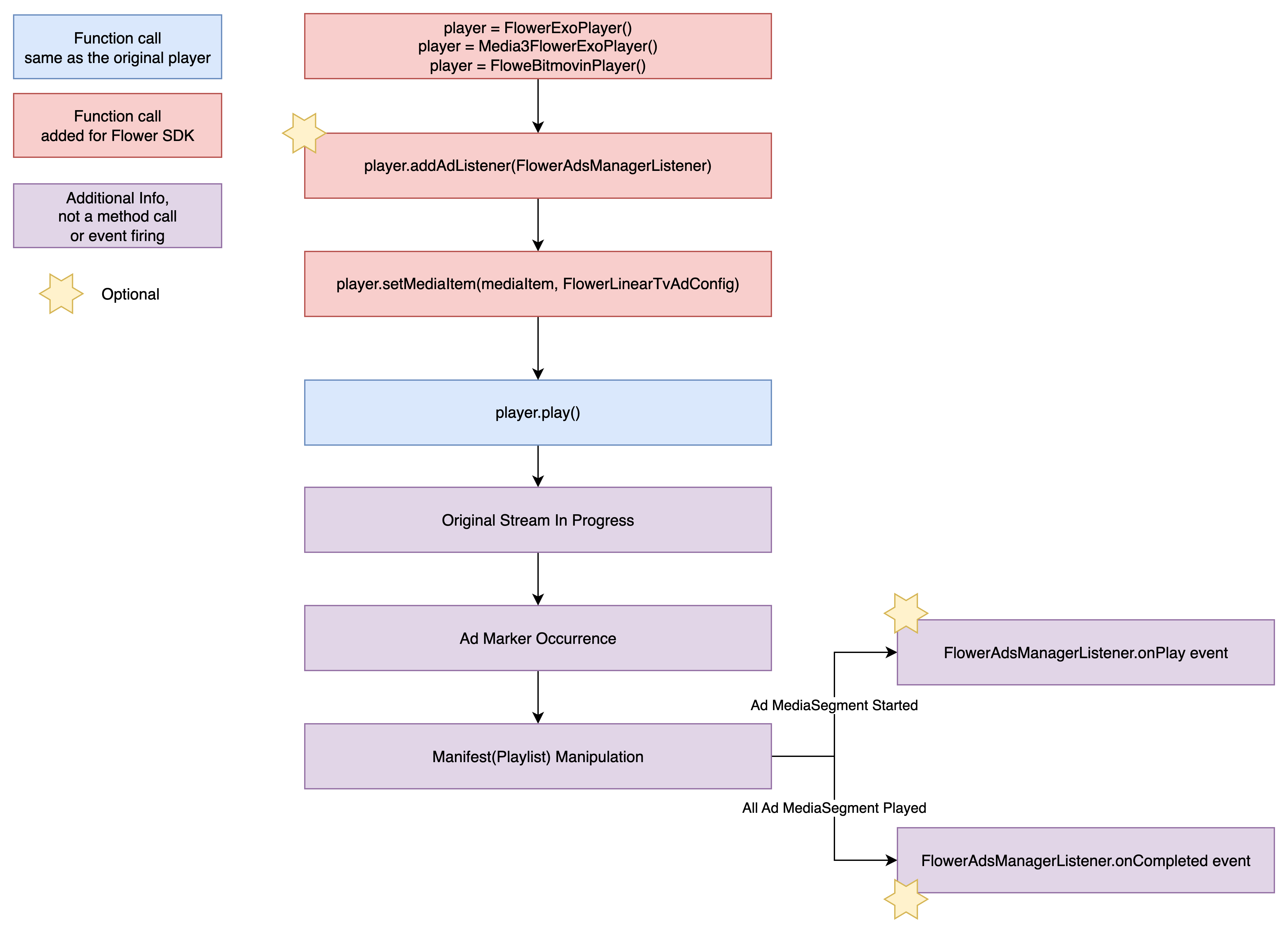
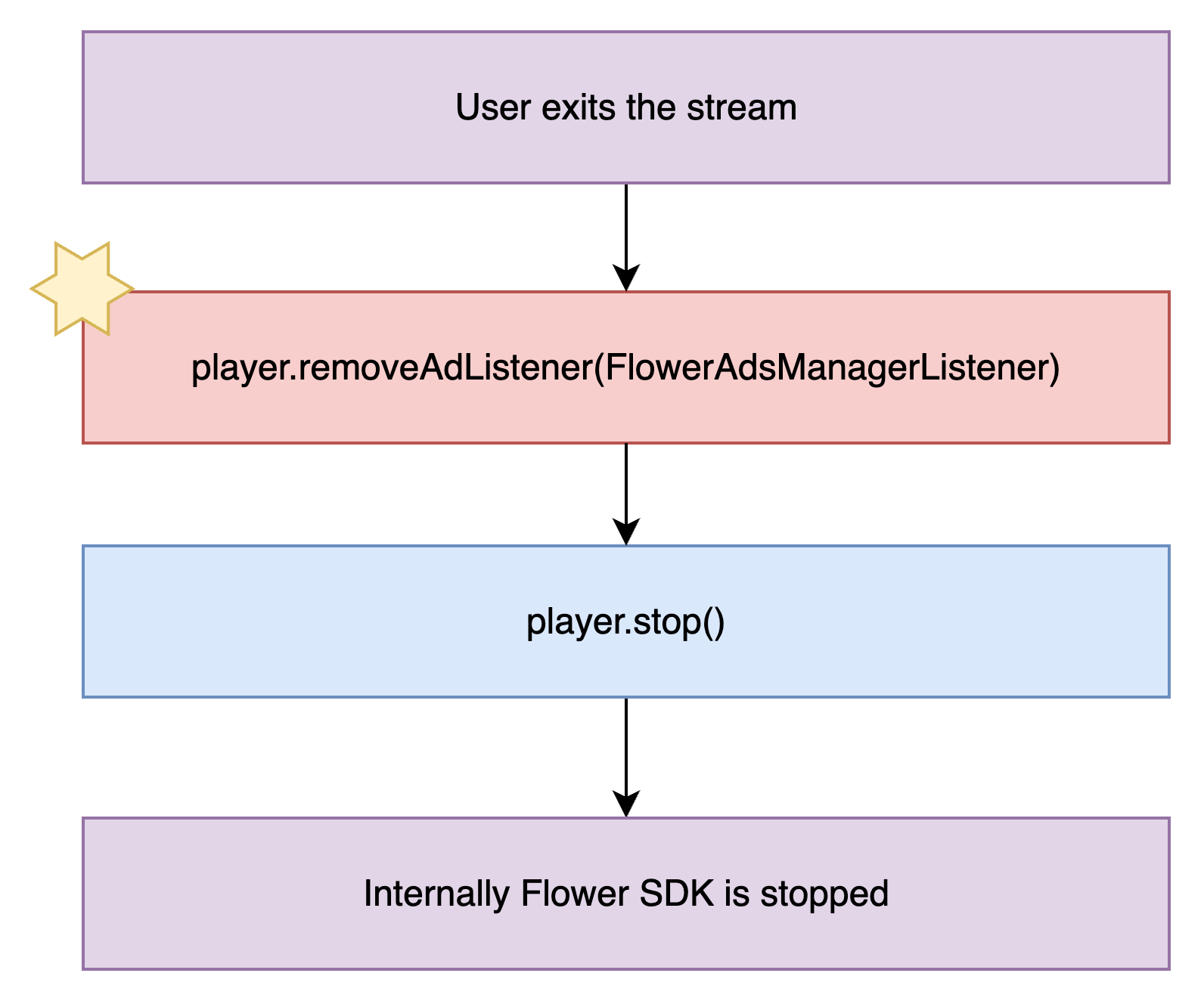
FlowerLinearTvAdConfig
Class used to specify information required for ad insertion in live broadcasts.
For more information, see FlowerAdConfig.
Pre-roll Ads
A channel pre-roll is an ad that plays once when the viewer enters a channel, before the live stream starts. To use it, set the pre-roll ad tag URL issued by Anypoint Media as prerollAdTagUrl of FlowerLinearTvAdConfig; leave it null for no pre-roll.
The Flower Player handles the pre-roll by itself. When the channel is loaded with the ad config, it requests the pre-roll, plays it, and loads the channel stream only after the pre-roll ends. Call prepare() and play() as usual: the Flower Player holds them until the pre-roll is ready. Do not call changeChannelUrl() or adsManager.play() yourself.
- Events: The listener registered with
addAdListener()receives the pre-roll events in the same way as other ads:onPlay()when the pre-roll starts andonCompleted()when it ends. - No ad or request failure: When the pre-roll response has no ad (
onAdBreakSkipped()) or the request fails, the listener receivesonCompleted()and the Flower Player starts the channel. - Failure while playing: When the pre-roll fails while playing, the listener receives
onError()and the Flower Player does not load the channel by itself. Restart the channel as described in Receiving Ad Events. - PIP: With the default
FlowerSdk.setIgnoreAdBreakInPIPMode(true), a channel pre-roll is paused when the user leaves the app and resumed when the user comes back, in the same way as VOD ads. Report this withFlowerSdk.notifyUserLeftApp(); see PIP Mode Support. - Channel switch: Loading another channel with a new
FlowerLinearTvAdConfigstops the previous channel's ad session and requests the new channel's pre-roll. - Same channel again: If the channel has not changed, the pre-roll is skipped. When the ad config is set again without a channel change, the Flower Player skips the pre-roll even if
prerollAdTagUrlis set, and plays the channel.stop()andrelease()do not count as a channel change; requesting VOD ads or inline ads does. For example, A → B → A plays A's pre-roll again, and so does A → VOD → A. This also applies when the user leaves the player screen and comes back to the same channel.
Receiving Ad Events
When inserting ads into linear channels, UI control logic may be needed at ad playback start/end points. For this, Flower SDK provides a listener interface FlowerAdsManagerListener for receiving ad events, which can be implemented as follows.
For more information, see FlowerAdsManagerListener.
val adsManagerListener = object : FlowerAdsManagerListener {
    override fun onPrepare(adDurationMs: Int) {
        // Nothing for linear tv
    }

    override fun onPlay() {
        // OPTIONAL GUIDE: Additional actions on ad playback start
        displayYourAdIndicator()
    }

    override fun onCompleted() {
        // OPTIONAL GUIDE: Additional actions on ad playback end
        hideYourAdIndicator()
    }

    override fun onError(error: FlowerError?) {
        // TODO GUIDE: on an error, stop the ads manager and the player, then restart the channel.
        //             Listeners are called off the main thread, so switch to the main thread first.
        CoroutineScope(Dispatchers.Main).launch {
            // FlowerExoPlayer2 / FlowerMedia3ExoPlayer: stop() and release() also stop the ads manager.
            // FlowerBitmovinPlayer: destroy() does, or call player.flowerAdView.adsManager.stop() first.
            player.stop()
            player.release()
            // Start the channel again: a Flower Player, then setMediaItem with FlowerLinearTvAdConfig, prepare, and play.
            // Use the same FlowerLinearTvAdConfig as the first start, including prerollAdTagUrl.
            // OPTIONAL GUIDE: limit consecutive restarts (e.g., 3 in a row) so a persistent error does not loop.
            playLinearTv()
        }
    }

    override fun onAdBreakSkipped(reason: Int) {
        // OPTIONAL GUIDE: Additional actions on ad skip
        logger.info { "onAdBreakSkipped: $reason" }
    }
}

// Register the listener to Flower Player
player.addAdListener(adsManagerListener)
Build the FlowerLinearTvAdConfig for the restart with exactly the same values as the first start, including prerollAdTagUrl. The viewer does not see the pre-roll again: the channel has not changed, so the Flower Player skips the pre-roll and plays the channel (see Pre-roll Ads). The first start of a channel and a switch to another channel use the pre-roll as configured.
Full Example
The example shows an example to insert ads in linear tv stream. The example uses FlowerExoPlayer2.
class PlaybackActivity : Activity() {
    // TODO GUIDE: Replace your ExoPlayer with FlowerExoPlayer2 or FlowerMedia3ExoPlayer
    private lateinit var player: FlowerExoPlayer2
    private lateinit var playerView: SurfaceView

    // OPTIONAL GUIDE: Create FlowerAdsManagerListener instance
    private lateinit var flowerAdsManagerListener: FlowerAdsManagerListener

    override fun onCreate(savedInstanceState: Bundle?) {
        super.onCreate(savedInstanceState)
        setContentView(R.layout.activity_playback)

        playerView = findViewById(R.id.player_view)

        playLinearTv()
    }

    override fun onDestroy() {
        super.onDestroy()
        player.stop()
        player.removeAdListener(flowerAdsManagerListener)
        player.release()
    }

    // Used for the first start of a channel and a restart after onError
    private fun playLinearTv() {
        // TODO GUIDE: Create ExoPlayer using standard ExoPlayer.Builder
        val exoPlayer = ExoPlayer.Builder(this)
            .setLoadControl(
                DefaultLoadControl.Builder()
                    .setBufferDurationsMs(
                        DefaultLoadControl.DEFAULT_MIN_BUFFER_MS,
                        DefaultLoadControl.DEFAULT_MAX_BUFFER_MS,
                        DefaultLoadControl.DEFAULT_BUFFER_FOR_PLAYBACK_MS,
                        DefaultLoadControl.DEFAULT_BUFFER_FOR_PLAYBACK_AFTER_REBUFFER_MS
                    )
                    .build()
            )
            .build()

        // TODO GUIDE: Wrap your ExoPlayer with FlowerExoPlayer2
        player = FlowerExoPlayer2(exoPlayer, this)

        player.setVideoSurfaceView(playerView)

        val videoUrl = "https://video_url"

        // TODO GUIDE: Configure linear tv ad
        // arg0: adTagUrl, Ad tag URL issued by Flower backend system
        //       You must file a request to Anypoint Media to receive a adTagUrl.
        // arg1: prerollAdTagUrl, (Optional) Pre-roll ad tag URL issued by Flower backend system
        //       You must file a request to Anypoint Media to receive a prerollAdTagUrl.
        // arg2: channelId, Unique channel ID
        //       Must be registered in Flower backend system.
        // arg3: extraParams, (Optional) Additional information pre-agreed for targeting
        // arg4: adTagHeaders, (Optional) HTTP header information to add for ad requests
        // arg5: channelStreamHeaders, (Optional) HTTP header information to add for original stream requests
        // Use the same values on a restart: without a channel change, the Flower Player skips the pre-roll.
        val adConfig = FlowerLinearTvAdConfig(
            adTagUrl = "https://ad_request",
            prerollAdTagUrl = "https://preroll_ad_request",
            channelId = "1",
            extraParams = mapOf(
                "title" to "My Summer Vacation",
                "genre" to "horror",
                "contentRating" to "PG-13"
            ),
            adTagHeaders = mapOf(
                "custom-ad-header" to "custom-ad-header-value"
            ),
            channelStreamHeaders = mapOf(
                "custom-stream-header" to "custom-stream-header-value"
            ),
        )

        // OPTIONAL GUIDE: Implement FlowerAdsManagerListener to receive ad events
        class FlowerAdsManagerListenerImpl : FlowerAdsManagerListener {
            override fun onPrepare(adDurationMs: Int) {
                // OPTIONAL GUIDE: Implement custom actions for when the ad playback is prepared
            }
            override fun onPlay() {
                // OPTIONAL GUIDE: Implement custom actions for when the ad playback starts
            }
            override fun onCompleted() {
                // OPTIONAL GUIDE: Implement custom actions for when the ad playback ends
            }
            override fun onError(error: FlowerError?) {
                // TODO GUIDE: Stop the player (and the ads manager) and restart the channel as shown in Receiving Ad Events,
                //            with playLinearTv()
            }
            override fun onAdBreakSkipped(reason: Int) {
                // OPTIONAL GUIDE: Implement custom actions for when the ad playback is skipped
            }
        }
        // OPTIONAL GUIDE: Register FlowerAdsManagerListener to receive ad events
        flowerAdsManagerListener = FlowerAdsManagerListenerImpl()
        player.addAdListener(flowerAdsManagerListener)

        // TODO GUIDE: FlowerAdConfig should be delivered in setMediaItem() method call
        val mediaItem = MediaItem.fromUri(videoUrl, adConfig)
        player.setMediaItem(mediaItem)
        player.prepare()
        player.play()
    }
}